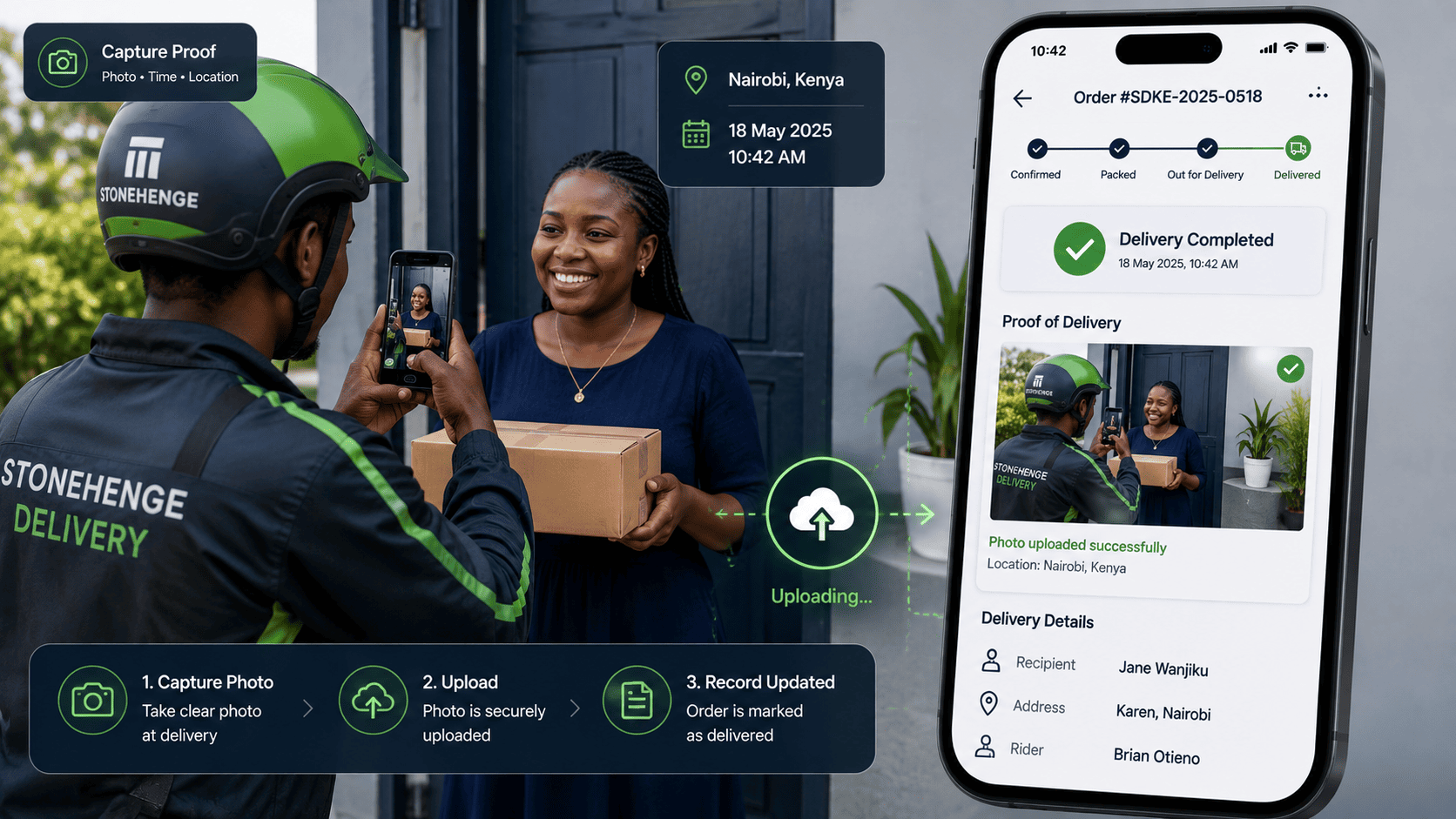
The Did Not Receive Headache
Your rider delivered the package. The customer says it never arrived. Without proof, you are stuck in a he said she said that often ends with you refunding at a loss.
The solution is simple and cheap. A delivery confirmation photo, taken by the rider and attached to the order record in your dashboard. This single practice can reduce did not receive disputes by up to 90 percent.
Two ways the same dispute can end
Same rider. Same package. Same customer. The only difference is whether a record exists.
Word against word
- Rider says the package was handed over
- Customer says nothing arrived
- No record of time, place or recipient
- Support has nothing to check
- You refund or replace to end the argument
- The same thing happens again next month
Evidence in seconds
- Rider uploads a photo at the door
- Timestamp and GPS attach automatically
- Customer receives a proof link instantly
- Support can pull the record in seconds
- False claims stop before they start
- Genuine issues get resolved fairly
This is not a theoretical figure. When a delivery record exists, most disputes simply do not get raised in the first place. The conversation changes from an argument into a lookup.
How to implement the delivery photo workflow
The rider app prompt
When the rider marks an order as delivered in the mobile app, the app automatically prompts for a photo of the delivered package or the recipient holding it. The photo uploads to the order record with a timestamp and GPS location.
"Take a photo of the delivered package." No option to skip, no extra training needed, no separate app to open.The proof of delivery message to the customer
After the photo uploads, the customer receives an automated SMS or WhatsApp message with a link to the proof. This informs the customer immediately and shows them that you have a record.
"Your order #1105 has been delivered. See your proof of delivery here."The delivery evidence tab on the dashboard
Each order record has a tab where the photo, timestamp and GPS coordinates are stored. If a dispute arises, you or your support team can pull up the evidence in seconds.
Support opens the order, clicks the evidence tab, and can answer the customer before the conversation escalates.The policy statement
On your website, include a note in your delivery policy explaining that riders take a photo at the point of delivery. This discourages false claims from the start.
"For your protection and ours, our riders take a photo at the point of delivery. This serves as proof of delivery in case of any dispute."Four things that make the proof usable
A photo without a timestamp is just a picture. A photo with a timestamp, a location and an order reference is evidence.
The ripple effects
Reducing disputes is only the first benefit. The record changes behaviour on both sides of the delivery.
Rider accountability
Riders know their work is being documented, which reduces pilferage and careless handling.
Customer trust
Customers appreciate the professionalism of receiving proof that their order was handled properly.
Better support answers
Support can respond with facts instead of guesses, which shortens every dispute conversation.
A practical note on getting it used
- Make the photo step part of marking an order delivered, not a separate task
- Do not let the rider complete delivery without an uploaded image
- Keep the photo requirement short and specific, so it takes seconds
- Store the images with the order record, not in a separate photo folder
- Review a sample of records weekly in the first month to confirm consistency
The summary
Stop losing money to false did not receive claims. Implement delivery confirmation photos and protect your bottom line.
The cost is a few seconds of a rider's time and a small amount of storage. The benefit is fewer disputes, better behaviour and a record you can rely on when it matters.
Ready to protect your deliveries?
Stonehenge Digital builds e commerce dashboards with rider capture, timestamped proof records and automatic customer notifications.
Set Up Delivery Photo Proof →Interested in E-Commerce Website with M-Pesa?
Let's build this for your business
Sell to any Kenyan with a phone. Full online shop with Safaricom STK Push payment — no card needed.