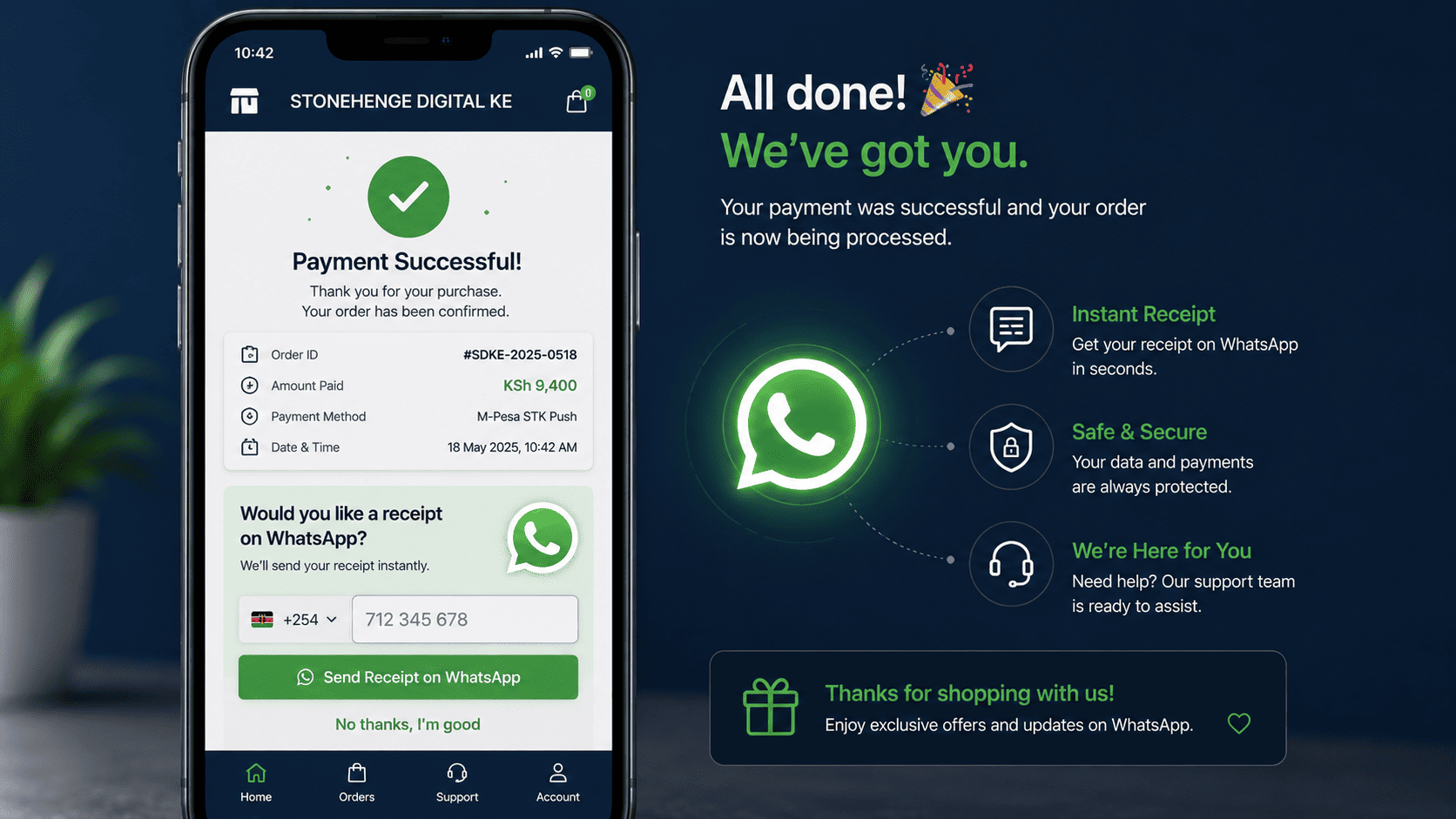
The Optional Question That Builds Your List
At the end of your checkout, after payment is confirmed, you have a golden opportunity to capture a customer's contact information. A mandatory email field causes friction. A simple optional question does not.
Ask a simple optional question: would you like your receipt sent via WhatsApp? Most customers say yes. And just like that, you have captured their WhatsApp number in a permission based, non intrusive way.
Why the wording matters more than the field
Two checkouts can ask for contact details and get completely different responses. The difference is not the technology. It is whether the customer feels asked or required.
- Feels like a gate before the receipt
- Customers type a throwaway address
- Some abandon rather than comply
- You collect data nobody reads
- The relationship ends at payment
- Feels like a useful offer
- Customers give the number they use
- Nobody is forced or delayed
- You collect a real, reachable contact
- The relationship continues after payment
The numbers behind the ask
Everyone wants a receipt, and everyone uses WhatsApp. The opt in rate for this question is typically over 80 percent, far higher than email newsletter sign ups, which often sit in the low single digits.
Why WhatsApp receipts are a CRM goldmine
High opt in rate
The receipt is genuinely useful to the customer, so the ask feels natural rather than promotional. That is why the response rate is so much higher than a newsletter checkbox.
A direct marketing channel
Once you have their WhatsApp number with permission, you can send order updates, exclusive offers and reorder reminders. This is a direct line to your customer, not filtered by an algorithm.
Rich customer profiles
Combined with order history, the WhatsApp number becomes the key to a rich customer profile. You can segment customers by purchase behaviour and target them precisely.
How to implement it
Add the question to the payment confirmation page
After the STK push completes, show the confirmation and the offer together. The customer is already pleased that the payment worked, which is the best possible moment to ask.
"Order confirmed! Would you like a receipt on WhatsApp? Enter your WhatsApp number."Automatically send the receipt
The system sends a WhatsApp message with the receipt as a PDF or image, plus a short thank you note. You can also include a small next purchase coupon code in the same message.
Receipt, thank you, and a code such as NEXT10 for a small discount on the next order.Store the number in the dashboard
The number is stored automatically in the customer's profile in your e commerce dashboard. You now have a customer list you can build on for future campaigns, with a clear record of when and how permission was given.
Each record should show the date the customer opted in, which is the evidence behind the permission.A profile that becomes usable
The long term value
A customer who receives their receipt via WhatsApp is now a subscriber. You can reach out to them with promotions, new arrivals and reorder reminders. Over time, this list becomes one of your most valuable business assets.
Owned attention
- Direct delivery to the customer
- Contact details you control
- Permission recorded at the source
- Segmentable by order history
- Portable if you change platforms
A note on using the list well
- Keep the frequency sensible, since the permission was for a receipt, not for daily offers
- Give an easy way to stop receiving messages, and honour it immediately
- Do not add customers who declined the receipt to any other list
- Never share or sell the numbers, since the permission was given to you
- Keep the opt in record so you can show when permission was granted
The summary
Do not let the moment of payment be the end of the relationship. Ask for the WhatsApp receipt, and build your customer list on autopilot.
One optional question, asked at the right moment, with a useful offer attached, is worth more than any newsletter checkbox you will ever design.
Ready to turn receipts into a customer list?
Stonehenge Digital builds checkouts that offer an optional WhatsApp receipt, send it automatically and store the number with a clear opt in record.
Set Up WhatsApp Receipts →Interested in E-Commerce Website with M-Pesa?
Let's build this for your business
Sell to any Kenyan with a phone. Full online shop with Safaricom STK Push payment — no card needed.