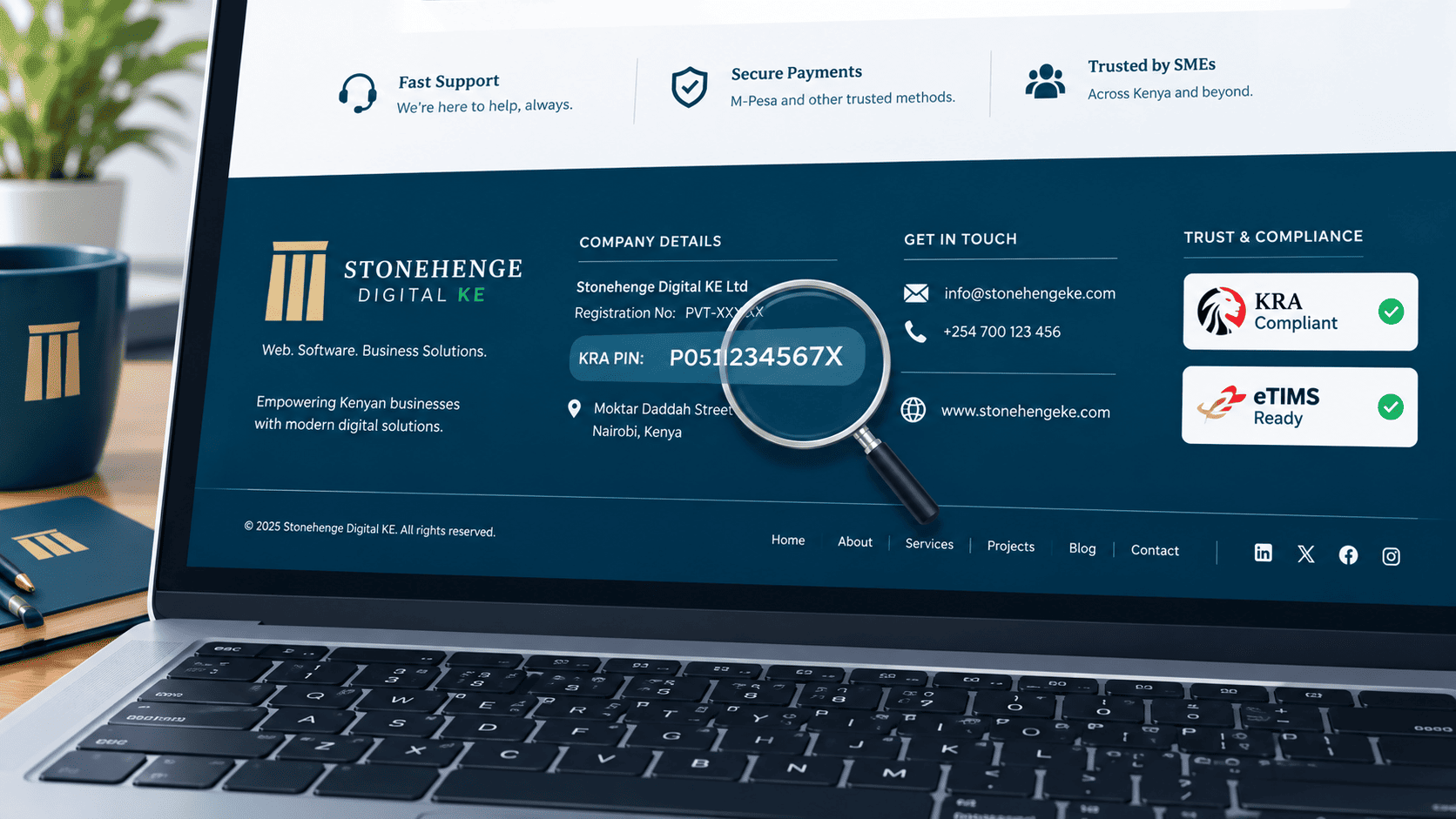
Why This Tiny Change Matters So Much
Procurement officers look for compliance signals in the first 10 seconds on your site. If they have to search for your KRA PIN, you have already lost points.
This tutorial shows you exactly how to add your compliance details to your footer so they appear on every page, with zero clicks required. It takes about twenty minutes, and it changes how the whole site reads.
Two sites, two very different first impressions
Same business, same services, same office. The only difference is whether the proof sits in plain sight or requires a search.
The officer has to hunt
- No registration number anywhere visible
- KRA PIN buried inside a PDF download
- Contact only through a form
- Gmail address on the contact page
- The officer moves on to the next supplier
The officer ticks the box
- Registration number and KRA PIN in the footer
- Physical address and phone on every page
- Business email on the domain, not Gmail
- Trust badges in a single row
- A compliance page they can open in one click
What to display in the footer
Seven items, one clean strip
- Registered business name, exactly as it appears on your certificate
- Company registration number, for example PVT 2024 123456
- KRA PIN, for example P051123456X
- Physical address, including building, street and town
- Phone number, ideally a Safaricom line
- Business email on your own domain, not a free provider
- Links to your privacy policy and accessibility statement
If a procurement officer needs any of these to verify you, the footer is the fastest place for them to land. It also happens to be the last thing a reader sees before leaving.
Step 1: Access your footer
Find the global footer component
The footer is usually a global element, which means editing it once updates every page. Where that control lives depends on your platform.
- WordPress: Appearance → Widgets → Footer Area.
- Custom build, such as a Stonehenge site: Site Settings → Footer.
- Confirm it is global: check that a change on one page appears on another.
Step 2: Format the text cleanly
Two lines, not one long sentence
Do not dump everything into a single paragraph. Structure it in two clearly separated lines so both legal identity and contact details are readable at a glance.
Savanna Logistics Ltd is a registered company in Kenya. Reg No: PVT 2024 123456 | KRA PIN: P051123456X
4th Floor, Westpark Towers, Waiyaki Way, Westlands, Nairobi +254 7XX XXX XXX [email protected]
Step 3: Add trust badges
Small, consistent, greyscale
Below the text, add small greyscale icons or text badges. They reinforce the same message as the text, without adding noise.
- KRA Compliant
- eTIMS Ready
- Professional body logo
Keep them roughly 60 to 80 pixels wide and the same size as each other. One oversized badge makes the rest look accidental.
Step 4: Add a compliance link to your menu
One dedicated page for full verification
The footer gives the signal. A dedicated page gives the proof. Create a page that a procurement officer can open in a single click.
What belongs on it
- Full certificate scans as PDF or high resolution images
- Verification links to the relevant portals
- A download credential pack button with all documents in one PDF
- The date each document was last reviewed
Add compliance as the last item in your main navigation, or directly under the About menu. It should be reachable without reading the footer.
Step 5: Test it
Run this before you log out
- Open your site on your phone, not a laptop
- Scroll to the footer without searching
- Can you find your KRA PIN in under three seconds
- Tap the compliance link. Does the page load quickly
- Can you read every line without zooming
If yes, you are done. If no, adjust contrast, size or position until the answer is yes. The test is the same one a procurement officer will run, usually without telling you.
The impact
This tutorial takes about twenty minutes. But it signals professionalism on every page of your site, twenty four hours a day. It is the cheapest trust upgrade you will ever make.
A quick pre launch checklist
- Registration number and KRA PIN are visible in the footer
- Physical address and phone appear on every page
- The email is on your own domain, not a free provider
- Trust badges are greyscale and consistently sized
- Privacy and accessibility links are present and working
- The compliance page is live and linked from the menu
- You passed the three second test on a slow phone
This is a tiny change. It is also one of the few website edits that pays off on every page, for every visitor, from the day it goes live.
Put your compliance details where an officer can find them in seconds. Do not make them work for information that should already be visible.
Want us to add it for you?
Stonehenge Digital builds organisational websites with a structured compliance footer, a dedicated compliance page and consistent trust signals across every page.
Add My Compliance Footer →Interested in Portfolio & Organisational Website?
Let's build this for your business
A professional, mobile-first website that makes your business look credible and gets found on Google.