E-Commerce | Payment Security
The Cost of Trusting a Screenshot
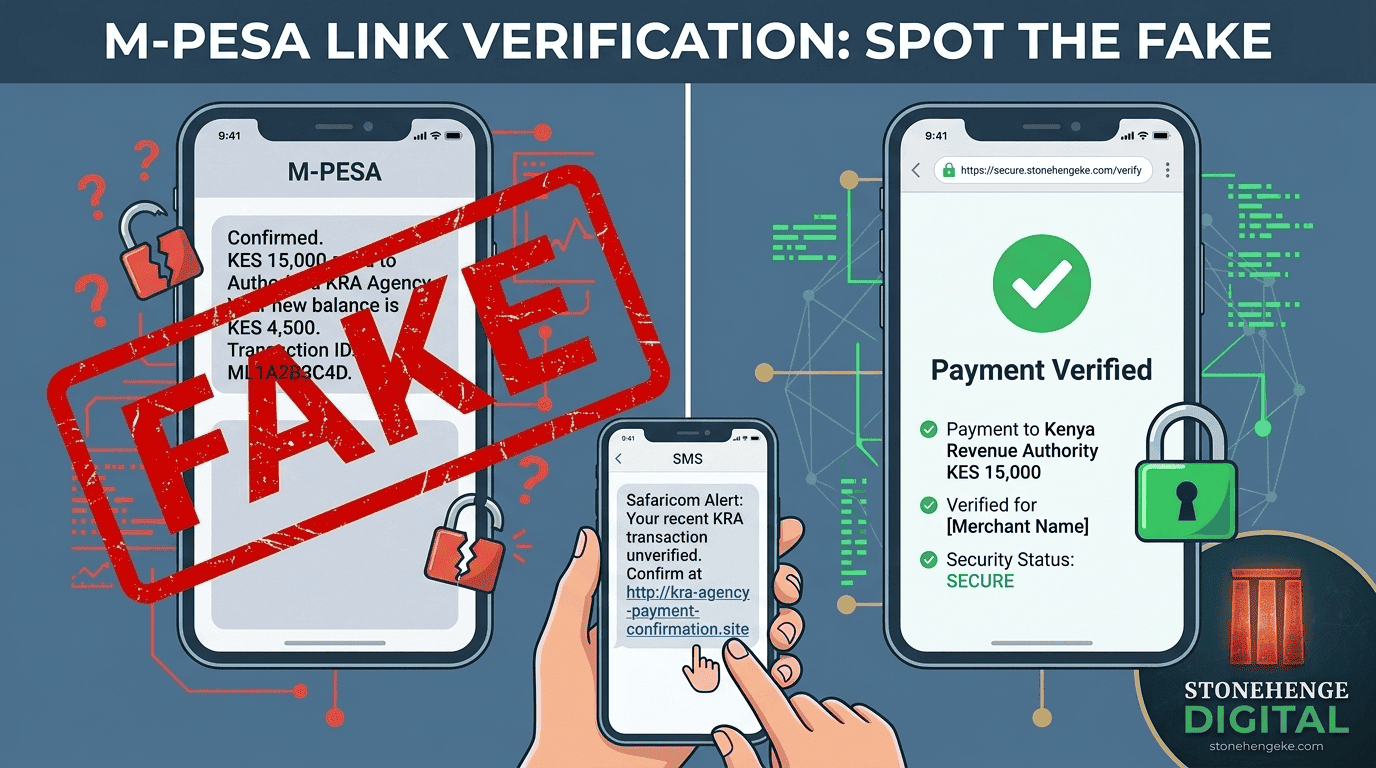
A customer places an order, claims to have paid through M-Pesa, and shows your staff a convincing confirmation screenshot. Everything looks right. The amount is correct, the transaction appears genuine, and the customer is ready to leave with the goods.
But there is one problem: has the money actually reached your business?
Fake payment confirmations can expose Kenyan businesses to avoidable losses. Edited images, fabricated messages, and increasingly convincing AI-generated content make visual inspection an unreliable way to establish whether a payment has succeeded.
This guide explains practical ways to verify M-Pesa payments using your actual transaction records, authorised payment integrations, and consistent procedures for your staff.
The golden rule
Never release goods based on a screenshot alone.
A screenshot is a claim that payment was made. Your business must independently verify the transaction before treating an order as paid.
Four Ways to Verify an M-Pesa Payment
The right verification process depends on your transaction volume, the tools available to your business, and the value of the order.
METHOD 01
Manual Verification
Check the official transaction records and verify the receipt details.
METHOD 02
Secure SMS Workflow
Use a secure link to check payment status through your verified backend.
METHOD 03
API Verification
Integrate supported Safaricom APIs into your business dashboard.
METHOD 04
Hold and Confirm
Verify high-value orders before dispatch or handover.
Method 01
Manual Statement Verification
Manual verification is a practical starting point for small businesses that do not yet have an automated payment integration.
- Ask the customer for the M-Pesa receipt number as an additional reference. Do not treat the receipt number alone as proof.
- Open your authorised M-Pesa business portal or transaction statement.
- Search the transaction history for the receipt number or use the available official transaction details.
- Verify that the amount, transaction status, recipient account, and relevant order details are consistent.
- Release the goods only after the payment has been independently confirmed.
The limitation
Manual verification takes staff time and becomes inconvenient when many customers are paying at once. A transaction that does not immediately appear should be treated as unverified until the discrepancy is resolved, not automatically declared fraudulent.
Method 02
Build a Secure SMS Verification Workflow
A secure verification workflow can reduce delays and help staff handle payment questions without arguing with customers about screenshots.
The key is that the link must connect to your own secure backend, which checks authoritative transaction data through a supported integration or verified business records. The link itself is not proof of payment.
How the workflow operates
The customer says they have paid
Your staff records the order reference and the amount expected.
Your system sends a verification link
The message goes to the appropriate customer contact associated with the order, using a secure, time-limited link.
The backend checks the payment records
The application checks available authorised transaction data and matches the receipt or transaction reference, amount, recipient account, and order details as supported.
The system displays the result
A confirmed payment is shown as verified. A missing, delayed, or inconclusive result remains pending investigation.
The order is updated safely
Your dashboard records the verified transaction and advances the order only after the required payment checks succeed.
Example SMS
Asante! To check the payment status for Order #[ID], please use our secure verification page: [Secure Link]. If your payment was just completed, it may take a short time to appear. Contact us if you need assistance.
Why this approach helps
Verification relies on transaction evidence
A fabricated screenshot cannot create a matching transaction in your official business records.
Staff get a consistent procedure
Everyone follows the same verification process instead of making personal judgements about a customer's screenshot.
Customers receive clearer feedback
A status page can explain whether a payment has been confirmed or still requires checking.
Important technical limitation
Do not assume the verification page can search every M-Pesa payment using just a phone number and amount. Build the lookup around the data exposed by your approved Safaricom integration or official imported transaction records. A payment that cannot yet be matched must remain unverified until further checks establish its outcome.
Method 03
Integrate Payment Verification into Your Dashboard
Businesses with custom e-commerce websites can reduce manual checking by integrating supported Safaricom Daraja APIs into their payment workflow.
Rather than asking staff to interpret screenshots, the system records the payment reference, receives payment notifications where configured, and uses supported transaction queries or transaction records to resolve uncertain cases.
Example dashboard action
Verify Payment
Order reference
ORD-1042
Expected payment
KSh 12,500
Verification status
Awaiting verificationIllustrative dashboard design. The button and status are examples, not a live payment check.
Which Safaricom APIs are relevant?
Transaction Status API
Allows an authorised business application to query the status of a known transaction using an M-Pesa receipt number or the relevant originator conversation ID.
View Safaricom Transaction Status documentationPull Transactions API
Safaricom documents a Pull Transactions API for retrieving recent C2B transaction records. Availability, permissions, and the supported retrieval window must be confirmed for your business setup.
Explore Safaricom Daraja APIsDeveloper note: Transaction queries may be asynchronous and subject to API permissions, quotas, and processing delays. Handle callbacks, errors, and pending results safely. Do not mark an order as paid merely because a verification request was accepted.
Method 04
Introduce a Hold and Confirm Policy for High-Value Orders
When an order involves expensive electronics, appliances, furniture, or other high-value products, the consequences of releasing goods before confirming payment can be significant.
Consider introducing a risk-based verification policy. For example, orders above KSh 20,000 might require a second check before dispatch or handover. The threshold should reflect your business, order value, and payment risks.
Suggested customer message
For your security and ours, we verify payments against our official transaction records before dispatching orders. Once your payment has been confirmed, we will update your order and notify you. Thank you for your understanding.
A consistent verification process reduces pressure on individual staff members and makes it easier to explain why an order is awaiting confirmation.
Communicate any expected processing time clearly. Do not promise that every verification will take a fixed number of minutes, since provider delays and incomplete transaction information may require additional checks.
How to Explain the Policy Without Offending Customers
Payment verification should not become a confrontation. Your team can be polite and professional while maintaining a firm rule that goods are released only after payment is confirmed.
Recommended response
"Asante for your payment. For your security and ours, we verify every transaction through our official payment records before releasing an order. We are checking your payment now and will update you as soon as it is confirmed."
This approach focuses on the business procedure instead of accusing the customer of dishonesty. Genuine customers receive a clear explanation, while the verification rule remains consistent for everyone.
Train Your Staff to Follow the Same Rules
Technology helps, but a secure payment process also depends on staff behaviour. Every person who handles orders, collections, or deliveries should understand how to respond when a customer claims to have paid.
- Teach the no-screenshot rule. Explain that screenshots and forwarded messages are not independent proof of payment.
- Provide the correct verification tools. Give authorised staff access to the business dashboard or official transaction records they need for their work.
- Practise difficult customer interactions. Role-play situations where a customer is impatient, upset, or insists that a screenshot must be enough.
- Create an escalation procedure. Staff should know when to contact a manager and how to handle abusive behaviour without compromising payment security.
A phrase every team member should know
"I understand. We apply the same verification process to every payment. I will help you confirm the transaction, and we will proceed as soon as it is verified."
The Cost of Not Verifying
One Unverified Payment Can Wipe Out Your Profit
A business that releases goods before confirming payment risks losing the product, its purchase cost, delivery expenses, and the time spent resolving the incident.
Illustrative loss scenario
KSh 45,000
Value of goods released without verified payment
Another illustrative scenario
KSh 12,000
Value of a single disputed order
These figures are illustrative examples from the supplied article content and should not be presented as independently verified case studies without supporting business records.
Replace Guesswork with Verified Payment Records
Protecting your business from fake M-Pesa confirmations does not require accusing customers or turning every sale into a lengthy investigation. It requires a consistent process that confirms the money has actually been received.
Start with official transaction records, train staff to reject screenshots as proof, and introduce a secure dashboard workflow as your transaction volume grows. For custom systems, use supported payment APIs and match transactions to the correct orders before updating payment status.
Verify the payment. Protect the goods. Keep the customer experience professional.
Secure Your Online Sales
Make Payment Verification Part of Your Business System
Stonehenge Digital KE helps Kenyan businesses build e-commerce websites with M-Pesa integration and practical order management workflows. Let's discuss how to make payment confirmation more reliable for your business and your customers.
Set Up Automated Payment Verification →Stonehenge Digital KE | E-commerce and payment solutions for Kenyan businesses
Interested in E-Commerce Website with M-Pesa?
Let's build this for your business
Sell to any Kenyan with a phone. Full online shop with Safaricom STK Push payment — no card needed.